
If you’re using BeTheme’s FAQ or Accordion blocks, you’ve probably noticed that while they look great on the front end, they don’t include any FAQ Schema behind the scenes.
That means Google, and increasingly, AI search engines, don’t actually understand that your FAQs are questions and answers. You miss out on the chance for your content to appear directly in search results as rich snippets.
Let’s fix that.
In this guide, I’ll show you two ways to add FAQ Schema to BeTheme pages:
- The manual way, where you write and embed the structured data yourself.
- The easy way, using my BeTheme FAQ Schema Generator plugin that automates everything.
What Is FAQ Schema and Why It Matters
FAQ Schema uses structured data (in JSON-LD format) to help search engines and AI systems understand your page content.
When it’s added properly, your questions and answers can appear directly in Google’s search results. Sites that implement FAQ rich results often see noticeable CTR improvements, typically in the 10–20% range, based on industry case studies.
Without schema:
Your FAQ section looks fine, but it’s invisible to search engines.
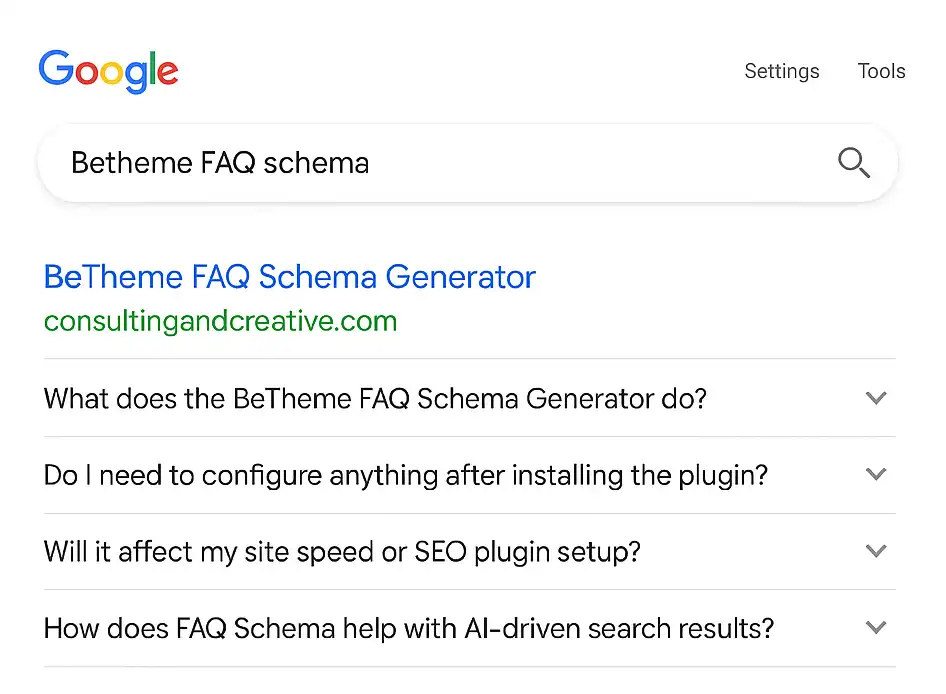
With schema:
Google can pull your questions right into search results like this:
Option 1: The Manual Way
Add FAQ Schema by Hand
If you want to go fully DIY, you can add the JSON-LD code manually to your page.
Here’s what the schema looks like for a simple FAQ section:
{
  "@context": "https://schema.org",
  "@type": "FAQPage",
  "mainEntity": [
    {
      "@type": "Question",
      "name": "Does BeTheme include FAQ Schema by default?",
      "acceptedAnswer": {
        "@type": "Answer",
        "text": "No. BeTheme’s FAQ and Accordion blocks display questions visually, but they don’t generate schema markup for search engines."
      }
    },
    {
      "@type": "Question",
      "name": "Can I add FAQ Schema manually?",
      "acceptedAnswer": {
        "@type": "Answer",
        "text": "Yes, you can copy this JSON-LD code into your site’s header or a code block and adjust the questions and answers."
      }
    }
  ]
}
You’d need to:
- Copy the template.
- Replace each question and answer manually.
- Paste it into your page
<head>or an HTML block. - Test it using Google’s Rich Results Test.
It works… but it’s slow and prone to errors.
If you update your FAQs later, you’ll need to rewrite the code each time.
Miss a comma or a quote, and the markup breaks.
Option 2: The Fast Way
Automatically Add FAQ Schema
(No Code Required)
That’s exactly why I built the BeTheme FAQ Schema Generator. It is a lightweight plugin that handles the entire process automatically.
You don’t have to write or paste any code.
Just use BeTheme’s existing FAQ or Accordion block, and the plugin generates valid, Google-ready schema instantly.
How it works:
- Install and activate the plugin.
- Create or edit a BeTheme page that includes an FAQ block.
- Click “Update” or “Publish.”
- That’s it. Your FAQ Schema is now embedded automatically in the page’s
<head>section.
You can verify it in seconds using Google’s Rich Results Test.
Paste your page URL, and you’ll see “FAQPage detected” with all your questions and answers listed.
Example output:
{
  "@context": "https://schema.org",
  "@type": "FAQPage",
  "mainEntity": [
    {
      "@type": "Question",
      "name": "What does the BeTheme FAQ Schema Generator do?",
      "acceptedAnswer": {
        "@type": "Answer",
        "text": "It automatically adds valid FAQ Schema (JSON-LD) to your BeTheme FAQ Items, helping Google and AI tools better understand your content."
      }
    },
    {
      "@type": "Question",
      "name": "Do I need to configure anything after installing the plugin?",
      "acceptedAnswer": {
        "@type": "Answer",
        "text": "Nope. Just install and activate it. Any BeTheme FAQ Item on your site will automatically output structured schema behind the scenes."
      }
    }
  ]
}
Why It’s More Than Just SEO
Structured Data and AI Search
Structured data isn’t only for Google anymore.
AI search engines like ChatGPT, Google Gemini, and Bing Copilot use structured content to better understand context and intent.
Adding FAQ Schema means your content isn’t just indexed, it’s interpreted.
That helps your brand show up in AI-driven summaries, featured answers, and conversational results.
How to Test It
Once your page is published, open Google’s Rich Results Test and enter your URL.
If you see “FAQPage” detected, you’re done. Your structured data is valid and ready to go.

Conclusion
BeTheme is a powerful builder, but like most themes, it skips some of the technical SEO details that make content stand out.
The BeTheme FAQ Schema Generator bridges that gap, automatically turning your FAQ sections into structured data that search engines and AI tools can actually use.
Automatically add Google-friendly FAQ Schema to your BeTheme FAQ blocks. No coding, no maintenance, just results.