
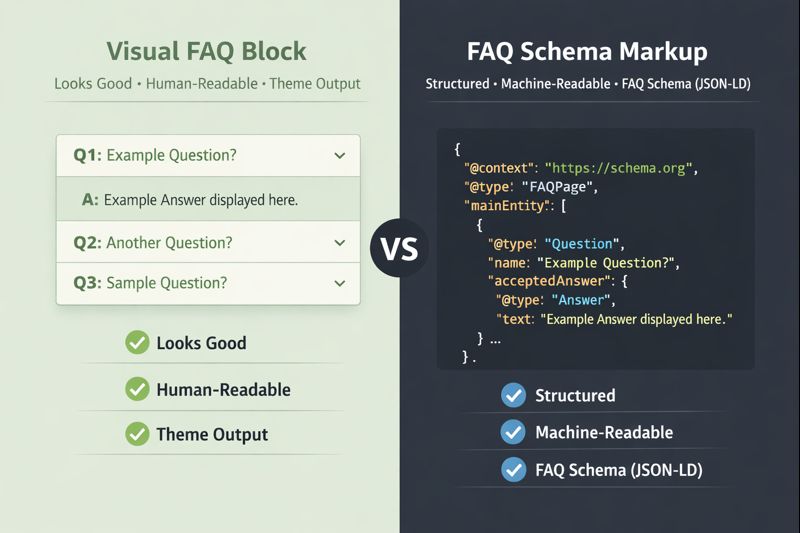
If you’re using BeTheme’s FAQ blocks, it’s reasonable to assume that your FAQs are already “SEO-ready.” After all, they’re structured, clearly formatted, and built specifically for questions and answers.
But there’s an important distinction that often gets missed:
BeTheme FAQ blocks control how your FAQs look.
FAQ schema controls how search engines, and increasingly, AI systems, understand them.
Those are two different things, and the difference matters.
As search engines become more selective and AI-driven tools play a growing role in how content is interpreted and surfaced, clarity and structure matter more than presentation alone.
In this post, we’ll break down what BeTheme’s FAQ blocks actually do, what FAQ schema is (and isn’t), and why relying on visual FAQ blocks alone can leave a gap in how your content is understood, not just by search engines, but by the systems that increasingly rely on clear, machine-readable context.
What BeTheme FAQ Blocks Do Well
BeTheme’s FAQ element is solid at what it’s designed for: presenting content clearly to users.
When you use a BeTheme FAQ block, you get:
- Clean, readable question-and-answer formatting
- Expand/collapse behavior for better UX
- Consistent styling within the BeBuilder ecosystem
From a user experience standpoint, this is exactly what FAQs should do.
But all of that output lives in HTML, meant for browsers and humans, not for search engines.
What FAQ Schema Is (and Why It’s Different)
FAQ schema is a type of structured data (JSON-LD) that explicitly tells search engines:
- “This page contains FAQs”
- “These are the questions”
- “These are the corresponding answers”
Instead of trying to infer meaning from page layout, Google can read this information directly in a machine-friendly format.
That distinction is critical:
- HTML explains how content is displayed
- Schema explains what the content means
Without schema, search engines are left to guess.
Why BeTheme FAQs Don’t Automatically Create FAQ Schema
BeTheme FAQ blocks do not output FAQPage JSON-LD by default. This isn’t a flaw; it’s simply outside the scope of what a theme is responsible for.
Themes focus on:
- Layout
- Design
- Content presentation
Schema, on the other hand, is about semantic meaning, and implementing it correctly requires context that themes and page builders often don’t have.
This is why many BeTheme users assume FAQ schema is “handled somewhere,” when in reality, it isn’t being generated at all.
“Doesn’t My SEO Plugin Handle This?”
This is another common assumption, and sometimes a risky one.
Most SEO plugins can add FAQ schema only if:
- FAQs are entered manually
- Or written in a very specific block or shortcode format
With page builders, things get trickier.
SEO plugins often:
- Can’t reliably parse builder-generated content
- Guess at what is or isn’t an FAQ
- Require duplicate content entry just to generate schema
That leads to brittle setups, inconsistent markup, or schema that doesn’t match what’s actually visible on the page.
Why This Difference Matters for SEO
FAQ schema doesn’t guarantee rich results, rankings, or featured placements, and it never has.
What it does provide is clarity.
When implemented correctly, FAQ schema helps search engines:
- Understand the intent of your content
- Confirm question-and-answer relationships
- Evaluate the page more confidently within its context
- FAQ schema can increase click-through rates and search visibility because it gives Google more context about page content
Especially as Google becomes more selective about when and how it surfaces enhanced results, accuracy matters more than ever.
That means clean, intentional schema, not guesses or workarounds.
Why Schema Markup Matters for AI (Not Just Search)
Search engines aren’t the only systems trying to understand your content anymore.
Large language models and AI-powered tools increasingly rely on structured, machine-readable signals to interpret and summarize information accurately. While AI doesn’t “read” schema in the same way Google evaluates it for search features, structured data plays an important role in reducing ambiguity.
Schema markup helps by:
- Clearly defining relationships between questions and answers
- Providing explicit context instead of relying on layout or visual cues
- Making content easier to interpret without guessing intent
As AI-driven search, summaries, and assistants continue to evolve, content that is clearly structured and semantically explicit is more likely to be understood correctly and represented accurately.
In other words, schema markup isn’t about chasing a specific AI feature or shortcut. It’s about preparing your content for systems that increasingly prioritize clarity, structure, and meaning over presentation.
FAQ schema is one small but meaningful way to do that.
That makes correct implementation even more important, especially when working with page builders.
The Safer Approach: Builder-Aware Schema
The most reliable solution is schema that understands how your content is actually built.
For BeTheme users, that means:
- Detecting native BeTheme FAQ blocks
- Generating valid FAQPage JSON-LD automatically
- Without duplicate content
- Without custom code
- Without changing how you build pages
If you want to see exactly how that works, we walk through it step by step in this guide: How to Add FAQ Schema to BeTheme Without Code
When FAQ Schema Is (and Isn’t) Worth Using
If you’re publishing real FAQs that:
- Answer genuine user questions
- Are visible on the page
- Aren’t stuffed with keywords
Then FAQ schema is still absolutely worth implementing, especially when it’s done cleanly and correctly.
If your “FAQs” are thin, promotional, or misleading, schema won’t help, and shouldn’t be used.
Why It Matters for Your Site
BeTheme FAQ blocks and FAQ schema serve different purposes. One improves usability. The other improves understanding.
Using BeTheme’s FAQ blocks without schema isn’t “wrong,” but it does leave SEO value on the table.
If you want your FAQs to be both user-friendly and search-engine-friendly, bridging that gap intentionally is the key.
If you’re looking for a simple, no-configuration way to do that, you can learn more here: